AWS Attendance System: Introduction
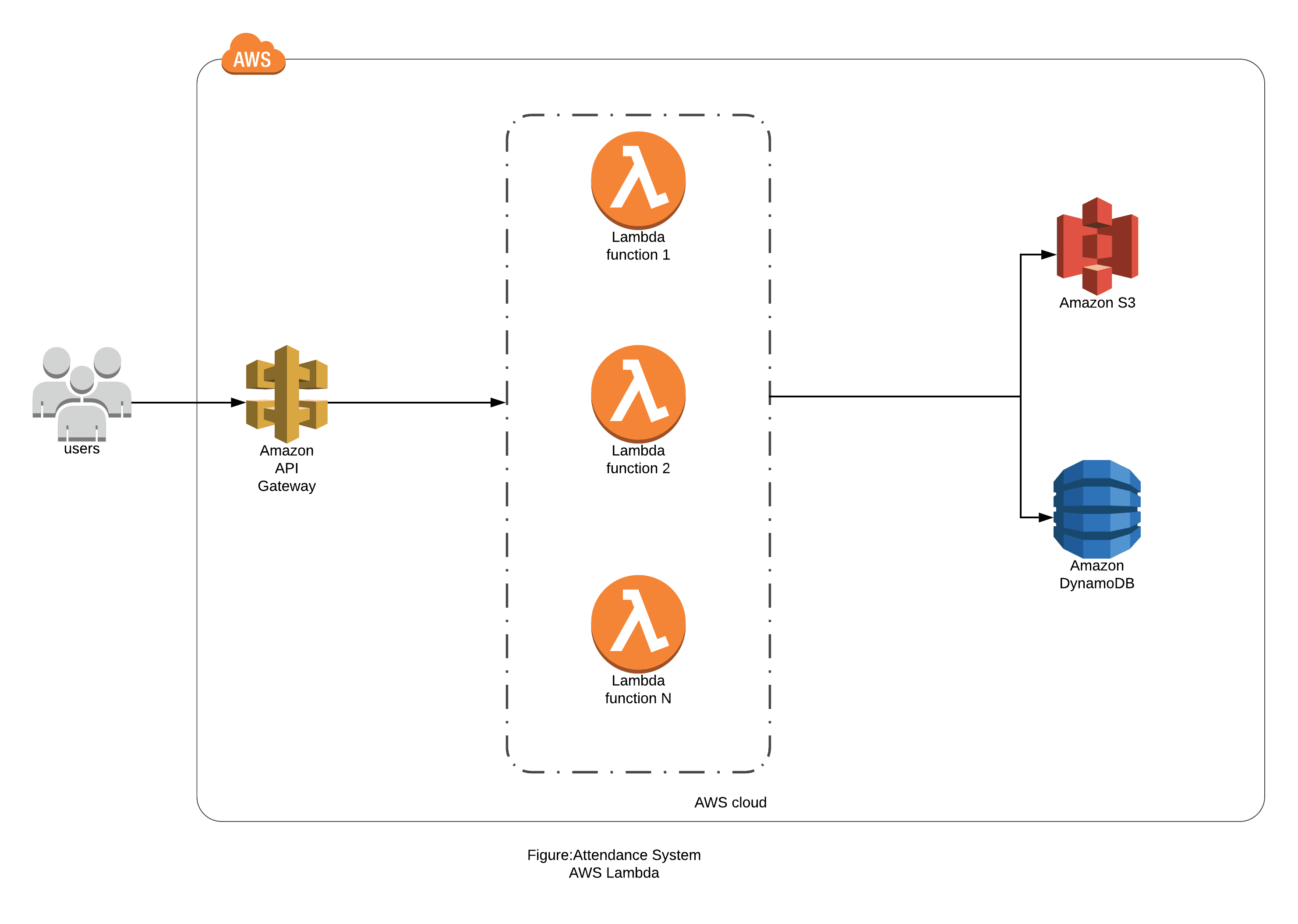
Genese Attendance System is built using AWS Serverless Framework where Dynamodb is used for Database, API Gateway is used for HTTP Requests, Lambda for Serverless Computing and Amazon Cognito for User Authentication. Furthermore, S3(with Static Web Hosting) and CloudFront is used for Hosting it. A serverless system that seeks the help of Image Analyzing AI service provided by AWS to track and record day to day employee attendance details of any kind of organization by Facial Recognition methods. It provides a simple user interface to monitor each and every record at any time. In addition, the system incorporates holiday package, leave management and other handy integrations. Here an Architecture Diagram shows the workflow of the Genese Attendance System.
AWS Services
- Lambda
- DynamoDB
- Simple Storage Service
- API Gateway
- Amazon Cognito
- CloudFront
- Amazon Rekognition
- Simple Email Service
Architecture Diagram
1. AWS Lambda Architecture for Attendance System.
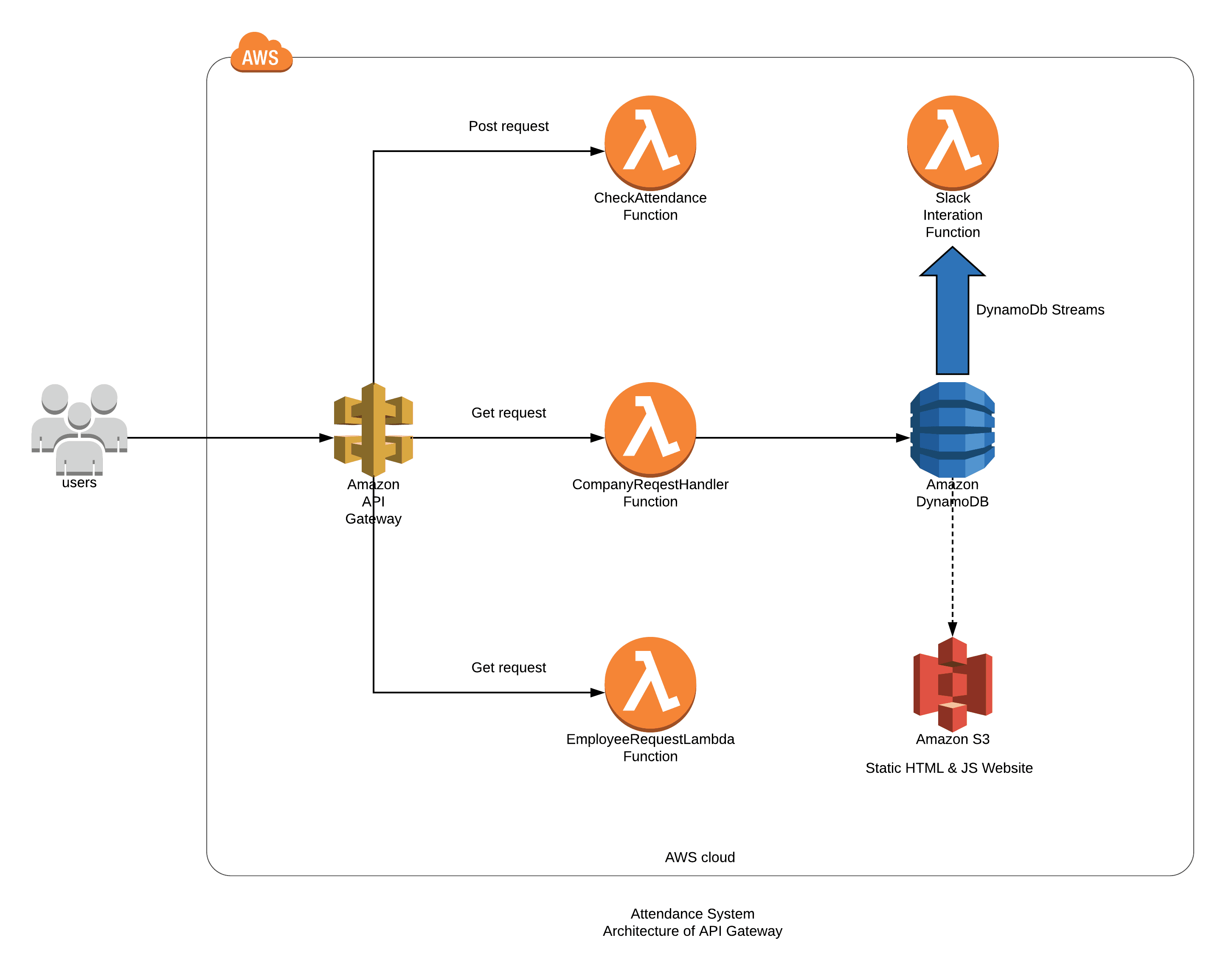
2. AWS API Gateway Architecture for Attendance System.
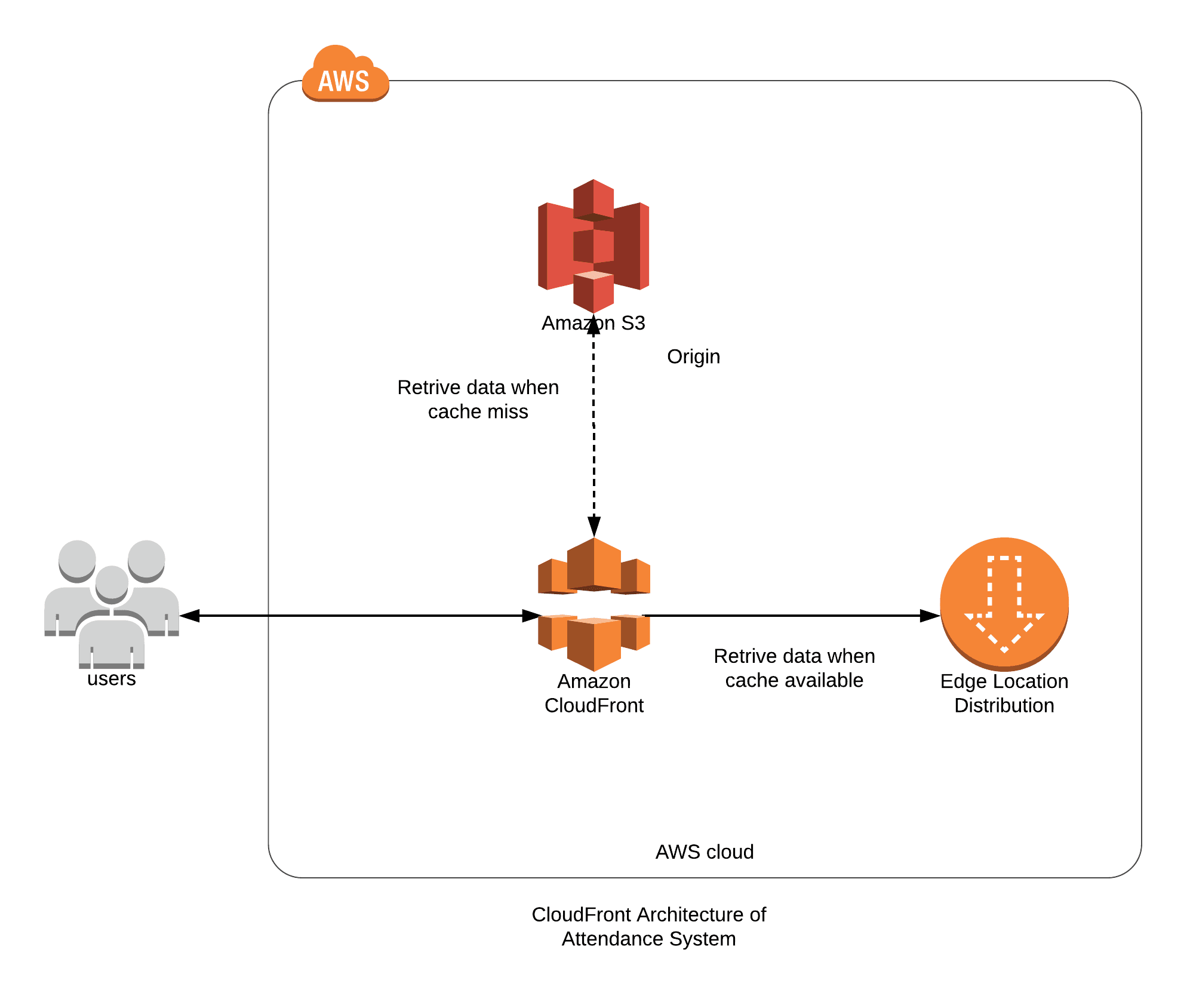
3. CloudFront Architecture for Attendance System.
AWS Services
1. TCO Analysis
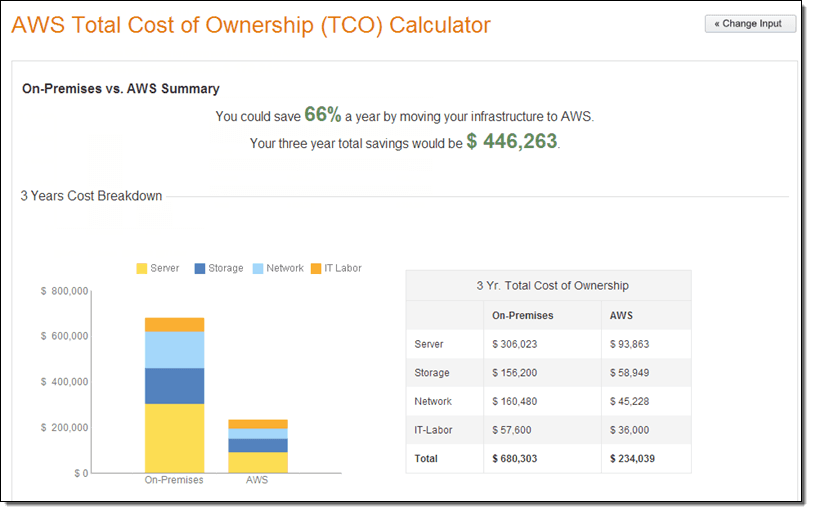
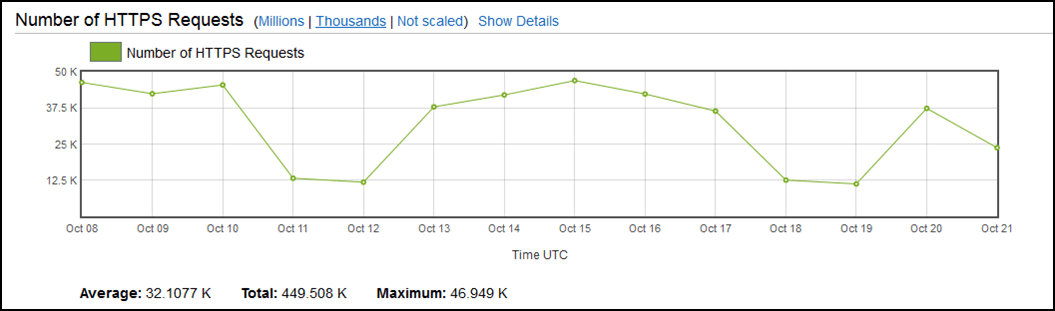
2. Detailed reporting with Cloudwatch Reporting and analytics dashboard
3. Signed URLs Cookies
4. Performance testing
Amazon API Gateway
1. Type of API Gateway solution being delivered
2. Guidance provided to the customer for effective monitoring solution and cloud watch metrics
3. API Versioning
4. Proficiency
Amazon DynamoDB
1.Description Dyanamodb Tables, their Primary Keys, and Indexes
Table 1: Employee
- Main Table: Name (hash key) & Date(sort key) For a particular date, a user has only one record in the table. So using “Name” as Hash Key and “Date” as Sort Key, it is efficient to perform query operation in the main table.
- Global Secondary Index: Name(hash key) & monthvalue(sort key) Since scan operation on DynamoDB table with large item count results in ineffective use of provisioned throughput, we seek the help of Global Secondary index to define a new primary key combination of “Name” as Hash Key and “monthvalue” as Sort Key. Doing so we can retrieve records of a user for a particular month from a query operation
Table 2: employee_details
- Main Table: username(hash key) This table stored the details of every user of the application. Each user is identical with each other with the username attribute. So the best option for a primary hash key is the username itself.
Table 3: event_records
- Main Table: companyusername(hash key) & date(sort key) Different company has different events of their own. A particular item in the table includes events records for events of a company on a particular date. So optimum efficiency is achieved by making the “companyusername” the Hash key and “date” as Sort Key.
- Global Secondary Index: monthvalue(hash key) An application requires frequent queries regarding events in a particular month, so we need to implement an index that has “monthvalue” attribute as the primary hash key.
Table 4:leave_requests
- employeeusername-index: employeeusername (hash key): The application queries every leave requests for a particular user. So for the smooth and effective query actions, this global secondary index with “employeeusername” as the Primary Key.
- managerusername-index: managerusername (hash key): Managers get a notification about any new leave request they are responsible for. To query the leave requests from a manager’s perspective, this index takes “managerusername” as the Primary Hash key.
- Main Table: leaveid(hash key) For every leave request, we generate a 32 digit unique UUID to serve as the primary hash key for the table.
2. Backup and Data Encryption of Dynamodb Table
3. Monitoring and alerting for read and write capacity
4. Dynamodb Workload Summary
- Write Capacity Units: Range between 20,000 to 25,000 WCU-Hrs
- Read Capacity Units: Range between 20,000 to 25,000 RCU-Hrs
- Total data storage: less than 5 GB till now
- Global deployment: In only one region (ap-south-1)
AWS Lambda
1. Uses and Workloads of Lambda Service
- Connection with other AWS Services:AWS Lambda functions act as the backend to the application. This application utilizes other AWS services and resources that are organized and manipulated by lambda functions. The application uses DynamoDB tables for storing data and records. Lambda is responsible for reads and writes of data from and to the database.For storing static files, AWS storage service S3 is used and all the GET and PUT operation is done by Lambda functions. Amazon Rekognition is implemented in Lambda function codes to do image processing tasks.Since this application is totally serverless, all the application logic resides inside lambda functions only. There is no need for any servers or containers in any kind of roles or tasks in the application.
- Automating Infrastructures provisioning and managing is not serverless AWS Lambda serves client side with appropriate data queries, user registration, and many other application tasks. Automation of Infrastructure provisioning and management is not applicable in this use case.
- Handle core data flow with AWS Lambda Each and every backend logic that the application is based on is hosted in AWS Lambda. All the logic behind DynamoDB table read and writes, S3 GET and PUT, Image processing tasks with Rekognition, Cognito Admin User creation etc. resides inside lambda functions.
2. Solution Characteristics for Lambda Functions
- AttendanceCognitoPolicy(Inline Policy)
- AttendaceDynamodbPolicy(Inline Policy)
- ses-full-access(Inline Policy)
- AWSS3DFullAccess(AWS Managed Policy)
- AttendaceRecognitionPolicy(Inline Policy)
- AttendaceS3Policy(Inline Policy)
- AttendaceSESPolicy(Inline Policy)
- Create and deploy different lambda functions
- Create API gateway methods to connect the lambda microservice with the front end logic.
- The application is composed of small independent services that communicate over a defined API.
- The Server Side Logic is written in Lambda functions, which are independent microservice functions of AWS.
- We have created a CloudFormation Template(CFT) to create and manage all of the microservice functions.
- Invocation per lambda function
- Duration of execution of lambda function
- Error in a lambda function
- Throttles to manage the flow of execution
- For Monitoring the execution of lambda functions, we have used CloudWatch Service of AWS.
- We have monitored different CloudWatch metrics of Lambda by the Name of Function.
- Load/Performance Testing: We used a package of node (npm) named loadtest to test the API request and Lambda Invocations. We have Installed the Package Locally with command: npm install -g loadtest. To perform Load Test, the command syntax will be like this: Command: ‘loadtest -c 10 --rps 200https://ginyod5w77.execute-api.ap-south-1.amazonaws.com/prod/openapi?addNewIntern=SendCredentials’
- Managing Failed Executions: We have used python boto3 library in our code. Lambda intakes certain parameters values from API Gateway event which determines what task is to be done. Every code logic includes python exception handling mechanism which minimizes failed executions to zero. Since all the moving part are handled for exceptions, there is no way of any failed execution. In certain cases, maybe the input parameters may be wrong and code logic may not comply with the input. In such case, lambda identifies the exception and returns an appropriate message to the client side.
- VPC vs No-VPC and concurrency: Lambda functions are not placed in any VPC’s as the application do not need to connect to any other servers that require VPC Secure Environment. Regarding concurrency limits, the default limit of 1000 concurrent executions is enough for a current use case. We might need a limit increase in the future.